
Rate Limits
Cap how fast and how much a single access token, or one source IP, can use it.
Per-access-token rate limits cap how fast and how much a single API token is used, so one app, website or visitor cannot exhaust your plan's shared quota. They apply to API tokens (pk.) on eligible paid plans, and are configured per token from the User Dashboard. A limit applies to the whole token, across every API called with it — for example Geocoding, Routing and Maps.
Maps calls do not enforce per-token rate limits yet. Account-level limits still apply, and per-token limits will cover Maps soon.
You can set two limits, each for the whole token or for every source IP:
| Limit | Whole token | Per source IP |
|---|---|---|
| Request rate | Total requests per second for the token | Requests per second from a single source IP |
| Daily limit | Total requests per day for the token | Requests per day from a single source IP |
Request rate defaults to your account's per-second limit, so the token can burst as fast as your account allows. Set a custom value to cap it lower. The per-IP request rate defaults to Off, which lets a single IP use the token's whole burst; set a custom value to spread that burst across many visitors instead.
Daily limit defaults to No limit, so the token adds no daily cap of its own and your plan quota applies unchanged. When you set one, it counts requests and resets at 00:00 UTC. It is an additional protection on top of your plan quota and does not change it — whether your account quota resets daily, monthly or not at all, your account quota rules still apply.
Custom values cannot exceed the account limit for the same period, and the effective limit is always capped by your account. If you lower your plan or an account limit changes, a saved custom value that is now higher is ignored and the lower account limit applies. The dashboard warns you when this happens.
The example below lets the website's search box token make 10 requests per second in total, but only 2 per second and 500 per day from any one visitor's IP:
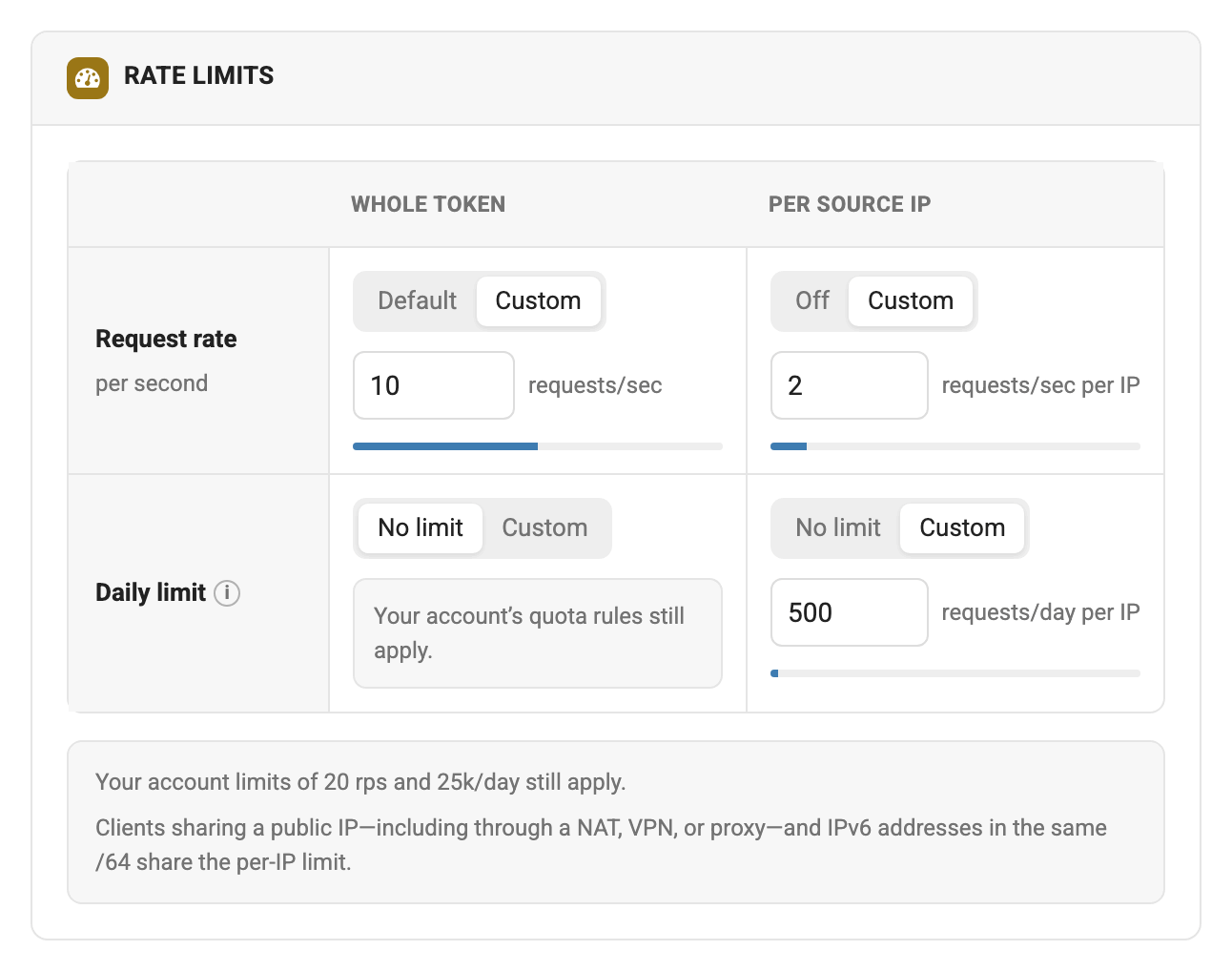
Per-IP limits are shared by everyone behind the same public IP. Clients behind a NAT, VPN or corporate proxy share one limit, and IPv6 addresses in the same /64 block share one limit.
When to Use Which Limit
- Per source IP for public apps and websites. When requests come from many visitors, cap each IP so no single visitor or scraper can use the token's whole allowance.
- Per-second limits for bursts. Set these per source IP so a single visitor cannot burst through the token, smoothing traffic and keeping you under your account's per-second limit.
- Daily limits for sustained usage. They cap total volume over time and help contain abuse that a per-second limit alone would let through. Use both together: per-second to control bursts, daily to control volume.
- Whole-token limits to divide a plan. If several websites or apps share one account, give each its own token and set a whole-token limit to split the plan quota between them.
- Scope limits to specific APIs. A limit covers every API the token can call. To limit only some APIs, create a separate token per API type and use scopes to grant each token only the APIs it needs; its limits then apply only to those APIs.
Limits are a safeguard, not a strict guarantee. They are applied close to where requests are served, so very bursty or widely distributed traffic can briefly exceed a whole-token limit. Use them to protect your quota and contain abuse, not as a hard global cap.
To set these limits, open Access Tokens on the User Dashboard, select the token and click Update, then use the Rate limits section. The token list shows which tokens have custom limits:
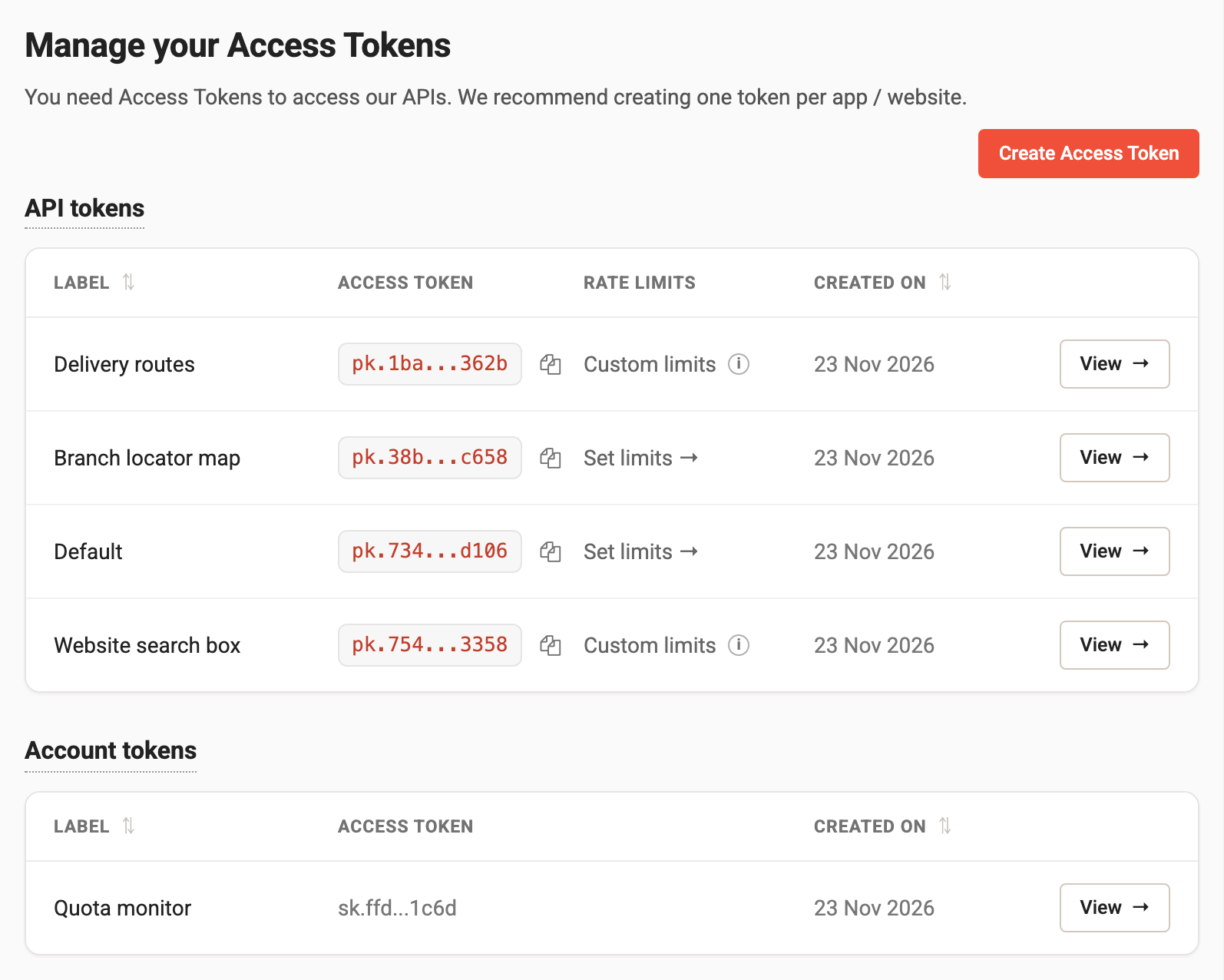
The token view shows the effective settings, and the dashboard's Rate limits report breaks down account, token and per-IP rejections by endpoint and date. Exceeding any limit returns HTTP 429; see Errors for the exact messages.